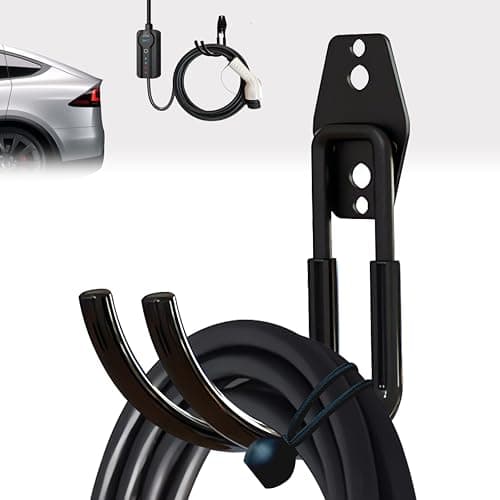
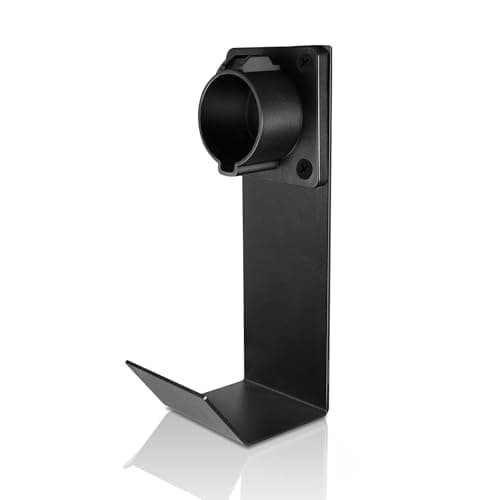
The best all-in-one organizer is the Lectron J1772 Holster + J-Hook: it docks the connector and gives you a hook to loop the cord, which is the entire job in one cheap part. If your charger already came with a holster and you only need to get the cable off the floor, the Nexoroot Steel J-Hook is the sturdier, connector-agnostic option — it holds the cable, not the plug, so it works with any charger you own now or buy next.
Cable management is the least glamorous thing you can buy for an EV charger and one of the few that pays for itself the same week. A typical Level 2 unit ships with a cable around 25 feet long, and unless something on the wall is holding it, all of that cord ends up coiled on the concrete between your car and the charger. That is a trip hazard in a dark garage, it drags the connector's metal contacts across a dirty floor, and it slowly kinks and wears the jacket at the point where the cable leaves the box. None of that is dramatic. It just quietly shortens the life of the most expensive part of the setup.
Why a cable on the floor is a problem worth fixing
There are three separate things going wrong when a charging cable lives on the ground, and a good organizer addresses all three:
- It is a trip hazard. A loop of stiff, heavy cable across the walking path between the car door and the wall is exactly where you step in the dark. Getting it up off the floor and onto a hook removes the thing people actually catch a foot on.
- It wears the cable. Cold weather makes an EV cable stiff, and repeatedly coiling and uncoiling a stiff cable on concrete works the jacket and stresses the strain relief where it exits the charger. A single hooked loop lets the cable hang in a relaxed curve instead of being crushed into a tight pile.
- It dirties the connector. When the plug rests on the floor, its pins and the inside of the coupler collect grit, road salt, and water. Docking the connector in a holster keeps the contacts up, clean, and dry between charges.
The two jobs: dock the connector, loop the cable
"Cable management" is really two tasks that people lump together, and knowing which one you have decides what to buy.
Docking the connector means giving the plug a home on the wall so it is not dangling or lying on the ground. That is what a holster does — it is a molded cradle the connector clicks into, shaped to match the connector so it seats securely. Looping the cable means getting the run of cord between the charger and the holster up off the floor. That is what a J-hook does — a simple arm you drape the cable over so it hangs in one clean loop instead of pooling.
Most people need both. The Lectron kit bundles a holster and a hook together, which is why it is our top pick for a single purchase. If your charger already included a holster — several of the units in our best home EV chargers roundup do — then you may only need to add a hook or two to manage the cable run.
Match the holster to your connector shape
This is the one place a cable organizer can be the wrong purchase, so it is worth being precise. A holster is molded to the shape of a specific connector. The Lectron holster is cut for the J1772 plug, which is the connector on the large majority of home and public Level 2 equipment installed today. If your charger has a J1772 connector, it fits.
A NACS (the Tesla-style connector, also called J3400) plug is a different shape and will not seat properly in a J1772 holster. As more vehicles ship with built-in NACS ports, more households will have a NACS connector on the wall — and a NACS connector needs a NACS-shaped holster, not this one. If you are not sure which connector your charger has, look at the plug: J1772 is the rounder five-pin coupler; NACS is the slimmer, flatter Tesla plug. A hook sidesteps the whole question, because it holds the cable rather than the plug and does not care what connector is on the end.
The picks
1. Lectron J1772 Holster + J-Hook — best all-in-one
This is the tidiest, cheapest complete fix for a J1772 charger. You get a holster that docks the connector off the ground and a J-hook to loop the cable, so one order solves both jobs. The holster fits any standard J1772 connector, and keeping the plug cradled on the wall keeps its contacts clean and dry between charges. It adds nothing to how fast you charge — it is purely about tidiness and protecting the hardware — but at its price that is an easy trade.
The only real limit is the connector shape: it is J1772 only. If your connector is a NACS (Tesla-style) plug, skip it — the holster is cut for the J1772 shape and will not seat a NACS connector properly. In that case, use the connector-agnostic hook below and add a NACS-shaped holster instead.
2. Nexoroot Steel J-Hook — best heavy-duty cable hook
If your connector is already docked, or you want a hook that will outlast several chargers, the Nexoroot is a heavy steel J-hook that holds a thick 40-amp cable without sagging. Its best feature is that it is connector-agnostic: it holds the cable, so it works with a J1772 or a NACS setup and carries over if you replace the charger. It does require drilling into the wall to mount, and it manages the cable but not the plug — so on a bare wall you would pair it with a holster for a full dock. For anyone who just needs 25 feet of cord off the floor, it is the single cheapest thing that makes a real difference.
What you can skip
Cable management is a category where it is easy to overspend on solutions to problems you do not have. Retractable ceiling reels and elaborate boom arms look impressive and can be worth it in a busy shared garage, but for one car and one charger they are far more money and hardware than a holster and a hook. The physics of the job is simple — get the plug docked and the cable looped — and a molded cradle plus a steel hook does exactly that for a fraction of the price.
What you should not skip is the pair itself, because cable damage is the most common way a charger's life ends early — not electronics failure, and certainly not the connector, which is rated for 10,000 plug-ins. We set out what actually fails, and in what order, in how long do EV chargers last. Mount the holster at a sensible height while you are at it; the mounting height guide covers the code minimum for a stored connector.
The same goes for portable chargers. A portable brick still ends up with a long cable and a connector that wants a home on the wall, so the very same organizers apply; you do not need a separate "portable" product. If you charge with a travel unit, mount a hook near where you park and dock the connector the same way you would a wall charger. See our portable charger roundup for the units that benefit most from a tidy spot on the wall.
How to choose a cable organizer
There is not much to get wrong here, which is part of the appeal, but three decisions cover every situation.
Do you need a holster, a hook, or both?
Start by looking at what your charger came with. If it shipped with its own holster — a few smart units do — then the connector is already handled and you only need one or two hooks to loop the cable run. If it came with nothing, buy the combined kit so you dock the plug and loop the cord in one go. The failure mode to avoid is buying only a hook, leaving the connector to dangle or rest on the floor, and wondering why the contacts keep getting dirty.
Confirm the connector shape before you buy a holster
A holster is shape-specific. Check whether your charger's plug is J1772 or NACS and buy the matching cradle — a J1772 holster will not seat a NACS plug and vice versa. If you expect to switch to a NACS-equipped vehicle and charger before long, a connector-agnostic hook is the safer spend, because it does not go obsolete when the plug on your wall changes. Our tethered vs. untethered explainer covers why the connector is attached to the charger in the first place.
Where to mount it
Mount the holster at roughly shoulder height, on the side of the charger nearest where the car parks, so the cable falls naturally toward the charge port without crossing the walking path. Put the hook between the charger and the holster so the slack hangs in one loop rather than piling at the base. Both parts screw into the wall, so find a stud or use anchors rated for the weight of a fully looped cable — a 40-amp cable is heavy, and a hook pulling out of drywall defeats the purpose.
What this does not do
A cable organizer is cosmetic and protective, not functional — it will not change your charge speed, add smart features, or make a slow charger fast. If your real complaint is charging speed or app control, that is a charger decision, not an accessory one; start with the best home EV chargers. And if you are still shopping for the outlet the charger plugs into, that is a separate and more important purchase — see our guide to NEMA 14-50 outlets.