HUB 05 · Guides & Buying Advice
EV Charger Not Connecting to Wi-Fi
The good news first: a charger that cannot reach your network almost always still charges your car. The bad news is that a garage is the worst place in the house for Wi-Fi, by design.
We earn a commission when you buy through our Amazon links, at no extra cost to you. It never affects our rankings, and we say so when the cheaper product is the better buy. How this works.
Start with the band. Nearly every EV charger on the market has a 2.4GHz-only radio, and nearly every modern router presents 2.4GHz and 5GHz under one network name with band steering — so the charger either cannot see the network at all or is handed a 5GHz connection it cannot use. The fix is to split the bands temporarily, or create a dedicated 2.4GHz-only guest network, and join the charger to that. If the charger still will not connect after that, work down the list below in order. And before you spend an evening on it: a charger that has lost Wi-Fi almost always keeps charging the car normally. You have lost the app, not the charger.
Worth saying plainly, because it reframes the whole problem: your charger is in a garage. Garages are at the edge of the house, often behind a masonry wall, frequently detached, and the charger's radio is inside a sealed weatherproof enclosure that is partly metal. The signal problem is structural, not a defect.
The five causes, in order of likelihood
1. The 2.4GHz band
This is most of the cases. Things to try, cheapest first:
- In the router, temporarily disable the 5GHz radio, connect the charger, then re-enable it. Many chargers remember the credentials and reconnect to 2.4GHz afterwards.
- Better: give the two bands different network names permanently, and join the charger to the 2.4GHz one. This also fixes every other 2.4GHz-only device you will ever own.
- Or create a 2.4GHz-only guest network for devices like this.
2. The password and the network name
Charger setup flows are often older than your router's defaults. Watch for a very long passphrase, non-ASCII characters or emoji in the network name, a hidden SSID, and WPA3-only security — several chargers need WPA2 or a WPA2/WPA3 mixed mode. If the app rejects the password repeatedly on a password you know is right, suspect the character set before the typing.
3. Signal strength at the enclosure
Measure it: stand where the charger is, hold a phone against the enclosure, and look at the signal. If it is marginal for a phone, it is worse for the charger. Remedies, in order of sense: move the access point, add a mesh node in the garage, or run Ethernet if the charger supports it. A powerline adapter is a reasonable last resort. A repeater placed at the garage, where the signal is already weak, mostly repeats the weakness.
4. The phone, not the charger
Most setup flows have the phone join a temporary access point broadcast by the charger, then hand over the credentials. That breaks when the phone has mobile data on and silently abandons a network with no internet, when location permission is denied to the app (both iOS and Android gate Wi-Fi scanning behind it), or when a VPN is running. Turn mobile data off, grant location, disable the VPN, retry.
5. Firmware and the commissioning order
Some chargers must be commissioned in a specific sequence — powered, paired over Bluetooth, then joined to Wi-Fi. Doing it out of order leaves the unit in a state that only a reset clears. Find the documented reset for your model before you improvise; on most units it is a button sequence or a press-and-hold on the enclosure, and on some it requires removing the cover, which means switching the circuit off first.
Do not take the cover off a live charger. If a reset procedure requires opening the enclosure, switch the breaker off first. There is 240 volts behind that cover and nothing in an app is worth it. If the procedure is not documented, contact the manufacturer rather than guessing.
What you lose, and what you do not
Worth being precise, because it determines how hard to chase this:
- Charging: unaffected on nearly every unit. The pilot handshake with the car is local. A charger offline is a charger that still charges.
- Schedules: it depends where they live. A schedule stored on the charger keeps running offline. One evaluated in the cloud stops. This is worth knowing in advance if you depend on off-peak rates — and it is an argument for scheduling in the car instead, which most EVs can do.
- Energy reporting: lost while offline, and usually not backfilled.
- Load management: this is the serious one. A system that throttles the charger against your panel needs its link to the monitor. Under NEC 750.30(C)(2) a compliant energy management system must cease current flow on failure — so on a correctly implemented system, losing the network can legitimately stop charging. That is the system working. See what a CT clamp is and the load-management roundup.
- Firmware updates: deferred. Not urgent, but not something to leave indefinitely either.
If it will not connect at all
At some point the right answer is to stop. A charger that works and has no app is a dumb charger, which is a category we rate and recommend. Schedule in the car, and move on. If the app genuinely matters to you — a utility program that requires managed charging, for instance — then the fix is a wired connection or a mesh node in the garage, not another evening with the setup wizard. For everything else that can go wrong with a charger, our troubleshooting guide and error code guide are the next pages to read.
Chargers that reduce the problem
Published specs on the three ways out of this, with live prices: a unit with Bluetooth as well as Wi-Fi, a unit whose app is worth keeping online, and a unit with no software at all.
| Charger | Best for | Published connectivity / specs | Price |
|---|---|---|---|
| Autel MaxiCharger (40A) | Feature-maximalists who want a tidy install | 40A / 9.6kW · J1772 · 25ft cable + holster · Wi-Fi + Bluetooth | $375.99 |
| Emporia Level 2 (48A) | Most people who want the smart features too | Up to 48A / 11.5kW · J1772 · 25ft cable · Wi-Fi + app | Not verified today |
| Lectron Level 2 (40A) | A simple, inexpensive plug-in charger | 40A / 9.6kW · J1772 · NEMA 14-50 plug · ETL · 16ft extension | $269.99 |
#ad Prices read live from the Amazon Product API as of October 16, 2026, and they move. Specs are the manufacturer's published claims from the live listing — we have not bench-measured them. Where we have no verified price we print none rather than a number that has gone stale.
What to look for if garage Wi-Fi is weak
Bluetooth as well as Wi-Fi. The single most useful spec here. Bluetooth lets you commission and control the charger from the car, at the charger, with no network involved. The Autel MaxiCharger lists both, which is exactly why it is the first pick on this page.
Schedules stored on the unit. Ask, or read the manual before buying. A locally stored schedule is the difference between an offline charger that still charges off-peak and one that does not.
An Ethernet port, if you have any chance of running a cable. Rare on home chargers and worth a lot when present. If the garage conduit run is already happening, an extra cable is nearly free at that moment.
Documented offline behaviour. "What does this do with no network?" should have a clear answer in the manual. If it does not, assume the worst.
Or no radio at all. If you have read this far and concluded the app is not worth it, that is a legitimate conclusion and the cheapest one. An ETL-listed non-networked charger has no setup to fail — see do I need a smart EV charger.
The gear
Recommended gear for this guide
The products this guide refers to, with prices pulled live from Amazon and dated on each card.
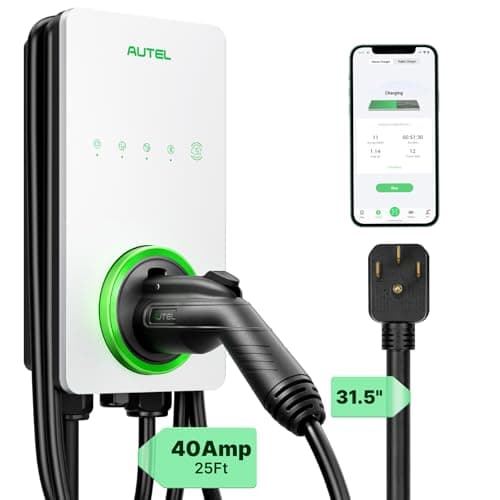
Feature-maximalists who want a tidy install
Autel MaxiCharger (40A)
A feature-dense smart unit with Wi-Fi, Bluetooth and a separate holster in the box — strong if you want everything and a clean install.
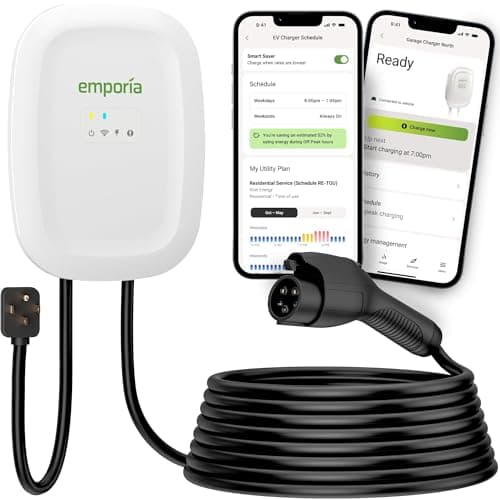
Most people who want the smart features too
Emporia Level 2 (48A)
The smart charger that does not charge a smart-charger premium — 48-amp capability and real energy monitoring for the price of a dumb one.
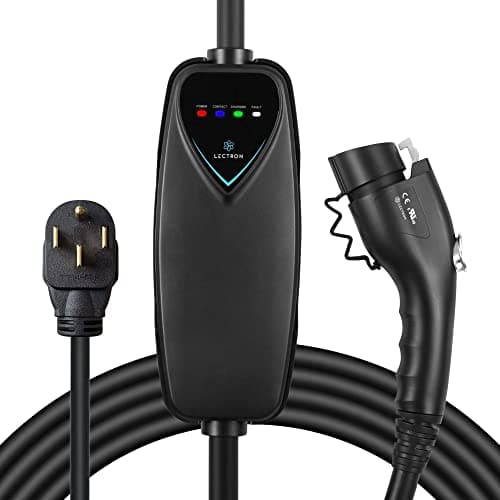
A simple, inexpensive plug-in charger
Lectron Level 2 (40A)
A simple, ETL-listed plug-in charger from a known EV brand — a no-frills, low-cost way to charge at Level 2.
#ad · As an Amazon Associate we earn from qualifying purchases.
Questions
Frequently asked
Will my EV still charge if the charger is not connected to Wi-Fi?
Why can't my charger see my Wi-Fi network at all?
Does a Wi-Fi extender in the garage help?
How do I reset an EV charger's Wi-Fi?
Keep reading
Related
- EV Charger TroubleshootingEverything else that goes wrong, in diagnostic order.
- EV Charger Error Codes ExplainedWhat the blinking light is actually telling you.
- Do I Need a Smart EV Charger?The honest case for skipping the app entirely.
- Best Smart EV ChargersWhich apps are worth keeping online in the first place.
- ChargePoint vs AutelA mature cloud app against a Bluetooth-plus-Wi-Fi unit.
Receipts
Sources
- Emporia — load management and monitor connectivity documentation
- ExpertCE — 2023 NEC EVSE load calculation and EMS requirements
We do not run a testing lab, and we do not pretend to. Where a measured number came from someone else's lab, we name them and link them. Where we could not verify something, we say so on the page rather than quietly leaving it out. Read our full method.