HUB 05 · Guides & Buying Advice
What Is OCPP?
The Open Charge Point Protocol is why a charging operator is not locked to one hardware brand. For a home buyer it is a nice-to-have — here is when it genuinely earns the premium.
We earn a commission when you buy through our Amazon links, at no extra cost to you. It never affects our rankings, and we say so when the cheaper product is the better buy. How this works.
OCPP — the Open Charge Point Protocol — is an open standard, maintained by the Open Charge Alliance, for how a charging station talks to a central management system. Its stated purpose is that any central system can connect to any charge point regardless of vendor. For a business running chargers that is genuinely important: it is the difference between owning your hardware and renting it from whoever wrote the firmware. For a homebuyer, it is a nice-to-have — and if you are choosing between a cheaper non-OCPP charger and a pricier OCPP one for a single car in a garage, the honest advice is that OCPP should not decide it.
That is an unusual thing for a site that sells chargers to say, so here is the reasoning in full, along with what the versions actually mean, because the version numbers show up on listings and almost nobody explains them.
The problem OCPP solves
A networked charger has two halves: the box on the wall, and the back end that authorises sessions, records energy, handles payment and pushes firmware. Historically each manufacturer wrote both, which meant the back end only worked with that manufacturer's hardware. For an operator that is a trap — the cost of changing hardware brand is replacing the entire software platform, and the cost of the platform going away is replacing the entire fleet.
OCPP decouples them. A charge point speaking OCPP can be managed by any compliant management system, so hardware and software become separately replaceable. That is the whole value proposition, and it is an operator's problem far more than a homeowner's.
The versions, and what each added
- OCPP 1.6 (released 2015). Still the workhorse of the installed base. Available in SOAP and JSON variants, and the version that introduced smart charging — load balancing and charging profiles — plus local authorisation list management. If a listing just says "OCPP," it usually means 1.6 JSON.
- OCPP 2.0.1 (introduced 2020). The intended successor. Adds proper device management, improved transaction handling, security features, more smart charging capability, support for ISO 15118, and display and messaging. Edition 3 of 2.0.1 was approved as an IEC standard, IEC 63584, in 2024 — which matters because it moves OCPP from an industry agreement to a formal international standard.
- OCPP 2.1. Builds on 2.0.1 with care taken that application logic written for 2.0.1 remains compatible. The headline additions are support for ISO 15118-20 with bidirectional power transfer, and a new functional block for bidirectional charging — vehicle-to-everything energy flows.
Reading a listing honestly. "OCPP compliant" on an Amazon product page is a claim about a protocol, not a promise that anything in your house speaks it. To use OCPP you need a management system to point the charger at, and for a single home charger that means self-hosting one — a real project, and a genuinely rewarding one if that is your hobby, and a waste of money if it is not.
When OCPP is worth paying for at home
- You want local control with no vendor cloud. This is the strongest reason. Pointing an OCPP charger at a management system running on your own hardware means the charger keeps working if the manufacturer's servers go dark or the app goes subscription. That is a real risk with cheap smart chargers and OCPP is the real mitigation.
- You run more than a couple of charge points. A small business, a strata, a short-let property with chargers — see best chargers for an Airbnb and EV charging for condos and HOAs.
- You need to bill someone. Session-level authorisation and metering with an audit trail is what OCPP management systems do, and it is not something a consumer app generally offers.
When it is not
One car, one garage, no billing, no intention of running server software: the features you will actually use are scheduling and energy reporting, and both come from the manufacturer's own app on chargers that make no OCPP claim at all. Paying an OCPP premium for a charger you will drive from a phone app is paying for an interface you will never open. If the vendor-lock-in worry is what drew you to OCPP, the simpler answer is often a dumb charger— no cloud, no account, nothing to deprecate.
The middle path most owners should consider: a well-supported smart charger from a company with a track record. Our smart charger roundup covers what the apps actually do, and do I need a smart EV charger works through whether you need any of it.
OCPP is not the only acronym on the listing
Two neighbours worth separating. ISO 15118is the car-to-charger communication standard — the one behind Plug and Charge and, in its -20 revision, bidirectional power. It is a different link in the chain from OCPP, which is charger-to-cloud; see Plug and Charge explained. OCPIhandles roaming between charging networks, which is why your account on one network works on another — see EV charging networks explained. None of the three substitutes for the others.
The picks, in context
Published specs on the three realistic home positions — strong app and monitoring, mature network-backed app, and no software at all — with live prices.
| Charger | Best for | Published specs | Price |
|---|---|---|---|
| Emporia Level 2 (48A) | Most people who want the smart features too | Up to 48A / 11.5kW · J1772 · 25ft cable · Wi-Fi + app | Not verified today |
| ChargePoint Home Flex | Buyers who want the established brand and app | Adjustable to 50A · J1772 · NEMA 14-50 plug · Energy Star | $599.00 |
| Lectron Level 2 (40A) | A simple, inexpensive plug-in charger | 40A / 9.6kW · J1772 · NEMA 14-50 plug · ETL · 16ft extension | $269.99 |
#ad Prices read live from the Amazon Product API as of October 16, 2026, and they move. Specs are the manufacturer's published claims from the live listing — we have not bench-measured them. Where we have no verified price we print none rather than a number that has gone stale.
What to look for if OCPP matters to you
A stated version, not just "OCPP." 1.6 JSON, 2.0.1 or 2.1. A listing that says only "OCPP compliant" is telling you very little, and the version decides what your management system can actually do with the charger.
Whether you can set the back-end URL. This is the test that separates real OCPP support from a marketing bullet. If you cannot point the charger at your own management system, OCPP buys you nothing — the manufacturer is simply using it internally.
Local operation when the network is down. A charger that refuses to charge without its back end is worse than a dumb charger. Confirm it falls back to charging rather than to sulking — and see Wi-Fi connection problems for how often this comes up in practice.
A UL or ETL listing, which OCPP says nothing about. Protocol support is not a safety credential. The certifications are a separate check and the more important one — our how to choose a charger guide covers them.
An honest look at whether you will run the server. OCPP without a management system is an unused feature. If you know you will not stand one up, buy on cable length, amperage, certification and price instead — and spend the difference on a longer cable.
The gear
Recommended gear for this guide
The products this guide refers to, with prices pulled live from Amazon and dated on each card.
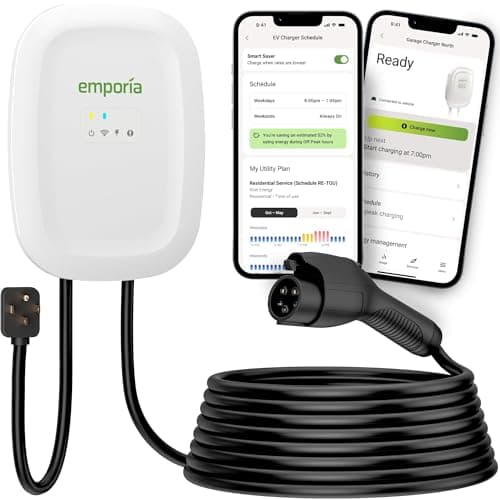
Most people who want the smart features too
Emporia Level 2 (48A)
The smart charger that does not charge a smart-charger premium — 48-amp capability and real energy monitoring for the price of a dumb one.
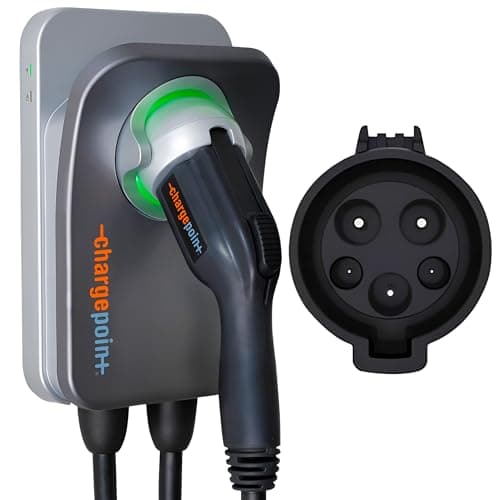
Buyers who want the established brand and app
ChargePoint Home Flex
The polished, well-supported option — adjustable up to 50 amps and tied into the largest public charging app in North America.
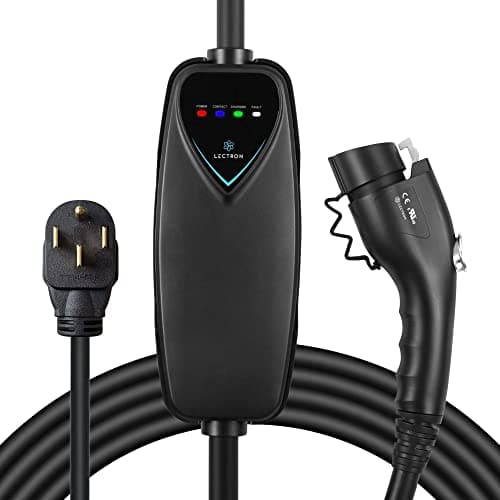
A simple, inexpensive plug-in charger
Lectron Level 2 (40A)
A simple, ETL-listed plug-in charger from a known EV brand — a no-frills, low-cost way to charge at Level 2.
#ad · As an Amazon Associate we earn from qualifying purchases.
Questions
Frequently asked
Do I need an OCPP charger for my home?
What is the difference between OCPP 1.6 and 2.0.1?
Does OCPP let my charger talk to my car?
Will OCPP support stop my charger from being obsoleted?
Keep reading
Related
- Best Smart EV ChargersWhat the apps actually do, version numbers aside.
- Do I Need a Smart EV Charger?The prior question, answered honestly.
- Plug and Charge ExplainedThe ISO 15118 side of the stack, which OCPP does not cover.
- Best Dumb EV ChargersThe other answer to vendor lock-in: no cloud at all.
- EV Charging Networks ExplainedWhere roaming protocols fit alongside OCPP.
Receipts
Sources
- Open Charge Alliance — Open Charge Point Protocol (versions and history)
- Embedded.com — The impact of OCPP and the evolution from 1.6 to 2.1
- Tridens — OCPP 1.6, OCPP 2.0.1 and OCPP 2.1 compared
We do not run a testing lab, and we do not pretend to. Where a measured number came from someone else's lab, we name them and link them. Where we could not verify something, we say so on the page rather than quietly leaving it out. Read our full method.