HUB 01 · Level 2 Home Chargers
How to Set the Amps on Your EV Charger
An adjustable charger ships at a default that may be wrong for your circuit. Setting it correctly is a two-minute job, and it is yours — not the installer's, not the app's.
We earn a commission when you buy through our Amazon links, at no extra cost to you. It never affects our rankings, and we say so when the cheaper product is the better buy. How this works.
Set the charger to 80% of its breaker, and never higher. A 40-amp breaker means 32 amps; a 50-amp breaker means 40; a 60-amp breaker means 48. That is NEC 625.42 treating EV charging as a continuous load and requiring the circuit to be rated at 125% of the charger's output — the same rule from the other direction. Your car's capability is irrelevant to this number, and raising the setting does not make the wire in your wall any thicker.
This is the step that gets skipped, and the reason the question gets searched so often is that adjustable chargers ship at a factory default. That default may be lower than your circuit allows — so you are charging slower than you paid for — or higher than it allows, which trips breakers and is genuinely unsafe. Either way, somebody has to set it, and on a plug-in install that somebody is usually you.
The number you need, in one table
Find your breaker in the left column. That row is your answer. Nothing about the car changes it:
| Your breaker | Set charger to | Power at 240V | Approx. range per hour |
|---|---|---|---|
| 20A | 16A | 3.8 kW | ~12 miles |
| 30A | 24A | 5.8 kW | ~17 miles |
| 40A | 32A | 7.7 kW | ~23 miles |
| 50A | 40A | 9.6 kW | ~29 miles |
| 60A | 48A | 11.5 kW | ~34 miles |
| 100A | 80A | 19.2 kW | ~58 miles |
Range figures assume roughly 3 miles per kWh, which is a reasonable average; your car will differ. The wire size and breaker guide pairs each of these with the conductor size it needs, and what amp charger do I need covers choosing the circuit in the first place.
If you do not know your breaker, stop and find out. Open the panel and read the number on the breaker feeding the charger — or on a plug-in install, the breaker feeding the receptacle. Do not infer it from the outlet: a 14-50 receptacle is supposed to be on a 50-amp circuit but is sometimes found on 40 or even 30 amps, and an adapter never raises what the circuit behind it can carry. The plug tells you the shape, not the limit.
Where the setting lives
There are three mechanisms, and which one you have changes the procedure:
- In the app. ChargePoint and Emporia-style units set the maximum current in their mobile app during setup, often by asking what breaker the charger is on and deriving the limit for you. Convenient, and worth re-checking after a firmware update or a factory reset — a reset can return the unit to its default.
- A physical selector inside the unit. Some chargers use a DIP switch or rotary selector behind the cover, set once at installation. This is the method the code contemplates for equipment whose rating depends on a restricted-access setting: it cannot be changed casually, which is the point.
- By the plug or installer configuration. Some units derive their limit from the plug fitted or from a setting the installer selects at commissioning. If an electrician hardwired your charger, this was their job — but confirm the number with them rather than assuming.
- On a portable, usually on the unit. Adjustable portables such as the WOLFBOX (6–40A) and Lectron NACS portable (8–40A) set current with a button or on a small display — which is exactly why they suit travel, where every outlet is different.
Your manual is authoritative for your model; the above is the shape of the thing, not a substitute for it. Also: your car may have its own charging-current limit in its settings. That is a separate control and it can only reduce the rate further — it cannot override the charger, and it is a frequent cause of unexpectedly slow charging.
How to check you got it right
- Watch the delivered power, not the setting. Your car or the charger app reports kW while charging. Compare it to the table above. If the breaker is 50 amps and you are seeing roughly 9.6 kW, you are correct; 7.7 kW means you are set to 32.
- Charge a full session and feel the receptacle. On a plug-in install, after an hour the plug should be warm at most. Hot, discolored or smelling of plastic means stop, step the current down and get the receptacle inspected.
- If the breaker trips, do not just reset it. Repeated trips at a setting the table says is fine point at the circuit, the GFCI or the charger — work through charger tripping the breaker.
- Re-check after any reset or firmware update. Especially on app-configured units. This is a 30-second check worth repeating.
When to deliberately set it lower
Lower than the maximum is sometimes the right answer, and it costs you very little:
- An outlet you do not know — travel, an old garage, a relative's house. Set conservatively; you can always step up.
- A tight panel. Reducing the charging current reduces the load the service has to carry, which can be what makes the install work at all. See best chargers for a 100-amp panel.
- Overnight is long anyway. At 32 amps a ten-hour window adds roughly 230 miles. If your daily drive is nowhere near that, the lower setting is free — the argument of the 32-amp roundup.
- A shared or guest charger where you want to cap exposure — see chargers for an Airbnb.
Chargers with a published adjustable range
If you are reading this page because your charger has no setting to change, that is the real answer. These are the units whose manufacturers publish a range rather than a single output — specs from the live listings, with live prices:
| Charger | Best for | Published adjustable range | Price |
|---|---|---|---|
| ChargePoint Home Flex | Buyers who want the established brand and app | Adjustable to 50A · J1772 · NEMA 14-50 plug · Energy Star | $599.00 |
| Autel MaxiCharger (40A) | Feature-maximalists who want a tidy install | 40A / 9.6kW · J1772 · 25ft cable + holster · Wi-Fi + Bluetooth | $375.99 |
| WOLFBOX Portable (Level 1/2) | One charger for home and travel | 6–40A · 9.6kW · J1772 · Level 1/2 · NEMA 14-50 + 5-15 · ETL · IP66 · 25ft | $299.99 |
#ad Prices read live from the Amazon Product API as of October 16, 2026, and they move. Specs are the manufacturer's published claims from the live listing — we have not bench-measured them. Where we have no verified price we print none rather than a number that has gone stale.
What to look for in the setting itself — and the gear that gives you one
A published range that covers your circuit. Before buying, check the manufacturer states a range, not a single output. ChargePoint publishes 16–50A, Autel 16–40A, WOLFBOX 6–40A. A fixed 40-amp charger cannot legally sit on a 40-amp breaker at all, and no setting fixes that.
A setting you can reach without the internet. If the only way to change current is a cloud app, you cannot adjust it when the network is down or the vendor's service is having a bad day. For a travel charger this is close to disqualifying.
Clear reporting of delivered power. A charger or app that tells you the actual kW is how you verify the setting took effect. Energy monitoring also surfaces a misconfiguration you would otherwise never notice.
Load management, if the limit is the whole house. A fixed lower setting is a blunt instrument; load management backs the charger off only when the rest of the house is drawing, giving you full speed the rest of the time.
And the thing no setting can fix: an undersized or worn receptacle. If your plug-in charger runs warm at the correct current, the fix is a properly rated outlet, not a lower setting.
The gear
Recommended gear for this guide
The products this guide refers to, with prices pulled live from Amazon and dated on each card.
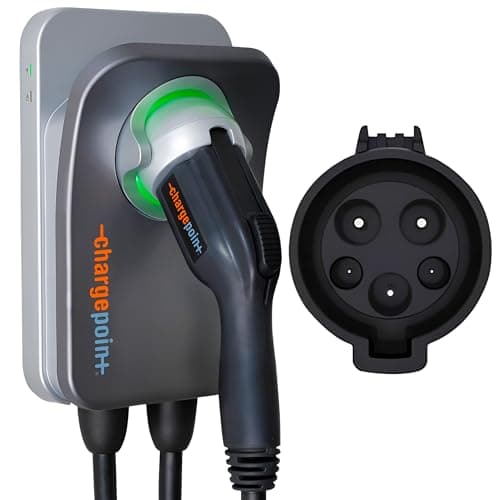
Buyers who want the established brand and app
ChargePoint Home Flex
The polished, well-supported option — adjustable up to 50 amps and tied into the largest public charging app in North America.
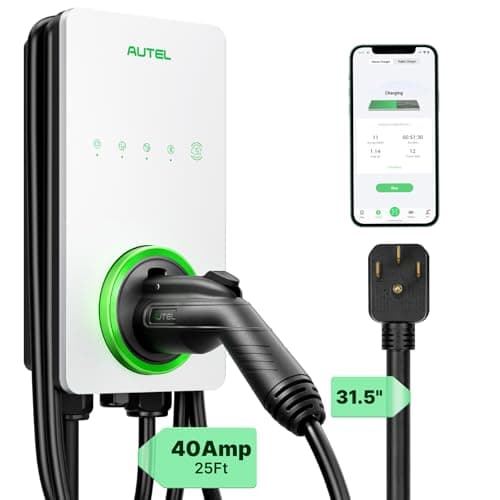
Feature-maximalists who want a tidy install
Autel MaxiCharger (40A)
A feature-dense smart unit with Wi-Fi, Bluetooth and a separate holster in the box — strong if you want everything and a clean install.
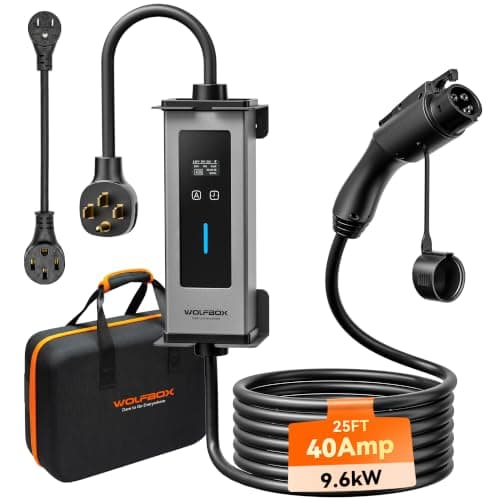
One charger for home and travel
WOLFBOX Portable (Level 1/2)
A dual-level portable that charges on both 120V and 240V, ships with both plug adapters, and adds a delay timer for off-peak charging — a genuine take-anywhere charger.
#ad · As an Amazon Associate we earn from qualifying purchases.
Questions
Frequently asked
What amps should I set my EV charger to?
Can I set my charger higher than 80% of the breaker?
Why is my charger charging slower than its rating?
Do I need to change the setting when using an adapter?
Keep reading
Related
- Wire Size & Breaker GuideThe conductor that pairs with each amperage setting.
- What Amp Charger Do I Need?Choosing the circuit, before you set the charger on it.
- Best 32-Amp EV ChargersThe adjustable units that run correctly on a 40-amp breaker.
- Charger Tripping the BreakerWhat to do when the correct setting still trips.
- Can I Use a Dryer Outlet?Why an adapter never raises the current you may set.
- Why Is Charging So Slow?Diagnosing a setting that is lower than you think.
Receipts
Sources
- EC&M — NEC Article 625, Electric Vehicle Charging Systems
- US DOE AFDC — EV charging levels and typical power
We do not run a testing lab, and we do not pretend to. Where a measured number came from someone else's lab, we name them and link them. Where we could not verify something, we say so on the page rather than quietly leaving it out. Read our full method.